Why check who doesn't follow you back
The first reason is your feed. According to Meta's Transparency Center, Instagram Feed starts by gathering all potential posts from accounts you follow. A lightweight model then picks roughly 700 of the most relevant ones. Every random follow competes for those slots with the friends and creators you open the app for.
The second reason is recommendations. The card for suggested accounts in the same center names where candidates come from: followers of accounts you already follow. Follow a shop for one giveaway, and its crowd joins the pool of people suggested to you. Feed predictions also rest on whom you have followed and what you have liked recently. The head of Instagram explained ranking himself, and our piece on how Instagram ranks content walks through his points.
The third reason is personal. Over the years a following list collects classmates, former colleagues, a nail artist and pages from old sales. People want to know which of them still read along and which quietly left. The answer helps decide whom to unfollow and whom to keep without hard feelings.
How to find non-mutual follows by hand
There are two directions. Following: the accounts you read. Followers: the accounts that read you. Our guide to following versus followers covers the difference, and the piece on mutual follows explains what counts as mutual. The search needs one rule: a name sits in your following list and is missing from your followers.
What your following list already offers
Open your profile and tap the number of accounts you follow. Next to each name in that list sits a link to shared activity. Instagram Help explains that shared activity shows tags, likes and comments between you and that account, plus your follows of each other. The feature works in the app on phones and iPads.
For a big cleanup it is slow: shared activity opens one person at a time. For a single doubtful name it is handy: shared activity shows whether any likes or comments passed between you and whether that person follows you. The full manual method relies on search inside your followers. The order goes like this:
- Open the accounts you follow and take the first name.
- Switch to your followers and type that name into the search field.
- The name shows up: the follow is mutual, move on.
- No result: the person does not follow you, note the handle.
- Go back to the accounts you follow and repeat for the next name.
The lists change while you work: someone follows, someone leaves. Write handles down right away and recheck doubtful names once more at the end.
How long it takes on a sample account
Take an account following 600 people with 450 followers. One name costs about 20 seconds: open search, type the first letters, read the result, go back. That adds up to 12,000 seconds, or 3 hours 20 minutes without a single break. With breaks, the work spreads over two evenings.
| Accounts followed | Time at 20 seconds per name |
|---|---|
| 200 | 1 hour 7 minutes |
| 600 | 3 hours 20 minutes |
| 1,500 | 8 hours 20 minutes |
| 3,000 | 16 hours 40 minutes |
Time grows with the list while attention drops. By the hundredth name the eye skips a handle that differs by one letter. An extra handle in your notes is harmless: you simply check it again. A missed handle is worse: the account you meant to drop stays where it was.
Which non-mutual follows are worth keeping
A missing follow-back says nothing about how useful an account is. Many valuable follows are one-sided by nature: a creator writes for thousands of people and cannot read everyone back. Before clearing anyone, run the list through four groups.
- Brands and shops. New arrivals, discounts and sale dates land here. A brand does not follow its buyers back, and that is normal.
- Experts and creators. A doctor, a lawyer, a photographer or a cook runs a profile for a wide audience. Their posts are the reason for the follow.
- News and city pages. Closed streets, water outages, weekend listings. Nobody expects a newsroom to follow back.
- Friends who never post. They opened a profile to watch and read almost nobody. Dropping them frees no space in your feed, because they have no posts.
Everyone else faces one question: which post from this account last proved useful to you. You remember it right away: keep. Nothing comes to mind within five seconds: that account is a candidate to drop.
Meta's Transparency Center describes two tools for the accounts you keep. Favorites collects the accounts you mark yourself. The Following view on the home screen shows posts only from accounts you follow, in reverse chronological order.
How to unfollow without hitting action limits
The action itself takes three taps. Instagram Help gives the path: open the profile, tap Following, then confirm Unfollow. The hard part is pace rather than buttons.
Instagram publishes no daily cap here. One ceiling is public: no more than 7,500 follows per account, and the help page calls it a measure against spam. The Community Guidelines ask people not to collect followers artificially. A long run of identical taps resembles that kind of inflation, even when a person does the tapping.
Pauses and batches
- Clear accounts in small batches and pause between rounds.
- Never mix following new people and clearing old ones in one session.
- Spread a long list over several days rather than one evening.
Apps that promise mass unfollowing ask you to sign in and then act in your name. Any restriction lands on your profile, not on the app. Our article on clearing everyone at once explains why no such button exists and what that sign-in puts at stake.
Signs of a restriction
The first sign is easy to spot: the action fails and an error message appears on screen. The second sits in settings. Account Status lists the features you can no longer use and offers a way to resolve the issue. Check it before every large cleanup.
Once you see a restriction, stop. Repeated taps do not lift a block, and a burst of retries looks like the same automation. Come back to the list in a few days and work slower, with longer pauses than before. Do not try to get around the restriction with a second device or a third-party app.
Comparing both lists without manual search
The Mutual Follows report does the same comparison in full: it takes a public profile, matches following against followers and sorts people into three lists. You do not sign in to your account or share a password. Any public profile works, yours or someone else's. A private profile gets turned away before payment, since its lists stay hidden from outsiders.
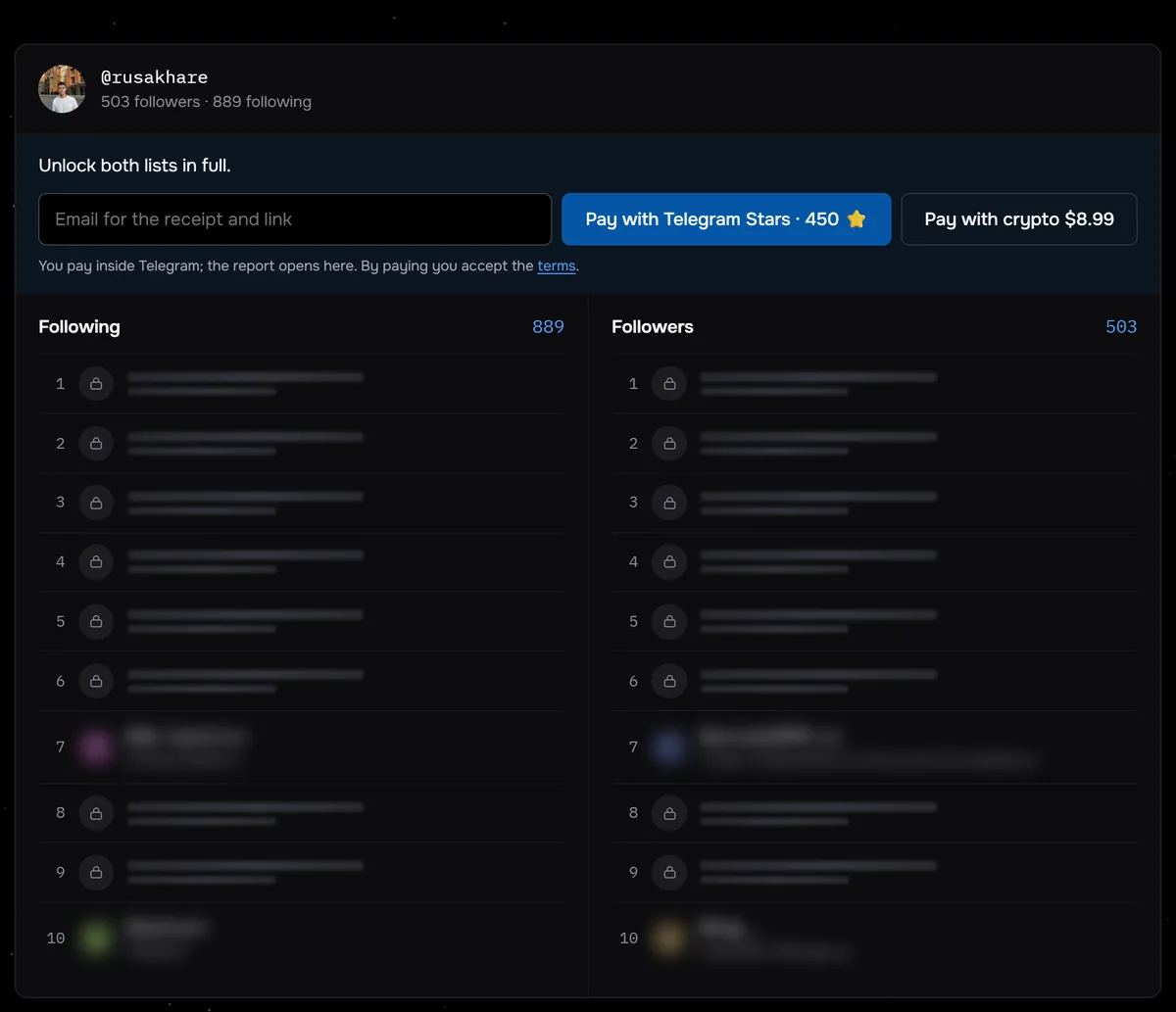
The screenshot shows @rusakhare with 889 following and 503 followers. Even if all 503 followers are among the accounts he follows, at least 386 of his follows are one-sided. Of the 117 profiles checked through Sled from August 24 to September 27, 2026, 43 followed more accounts than followed them.
From there you work down a ready list of non-mutual follows: handle, decision, next row. The report has search and a CSV export, so your notes on names already reviewed stay with you. The pauses from the previous section still apply: the report removes the search, not the taps. A short page on accounts that don't follow back gathers the essentials on one screen.
Three ready lists for a public profile: not following back, following only you, and mutual. No login and no password.
Compare following and followersHow to keep your following list in order
A list grows faster than it seems: following costs one tap, while dropping someone takes a decision. A monthly cleanup takes less time than a yearly one. Over a month only a few new names appear, and you still remember where each one came from.
- Once a month, compare the lists and save the export with the date in the file name.
- Set it next to the previous one and look only at new non-mutual names.
- Run the new names through the four groups above.
- Clear accounts in batches with pauses and move doubtful names to next month.
- Add the creators you value to Favorites so their posts stay in sight.
What to do with inactive accounts
Inactive accounts publish nothing for months. They take no room in your feed: the feed gathers posts, and they have none. They get in the way elsewhere: they bloat the list, clutter the comparison and fill rows under the 7,500 ceiling.
Split them in two. Keep friends who never post: dropping them does nothing for your feed. Abandoned shops, closed projects and pages from old giveaways can go without regret.
Common questions
How can you see who doesn't follow you back without third-party apps?
By hand: take the accounts you follow one at a time and search for each among your followers. Anyone missing there does not read you. On an account following hundreds of people this takes several hours.
How many accounts can you unfollow per day without a restriction?
Instagram does not publish that number. The help center lists only the general ceiling of 7,500 follows per account. Work in batches with pauses and spread a long list over several days.
Should you drop every non-mutual follow?
No. Brands, experts, news pages and friends who never post do not follow back by nature. Drop the accounts whose last useful post you cannot recall.
Can you check a private profile?
No. A private account hides its following and followers from outsiders, so there is nothing to compare. The report turns such a profile away before payment.