Where free followers come from: three schemes
Every follow is made by some profile: people earning points, bots or your own account. The offer rests on three levers of persuasion.
The first is reciprocity: exchange members follow other profiles and expect follows in return. The second is social proof: people trust a big follower count. The third is the sample: after a gift, paying for a package feels easier.
Tasks: your account follows and likes for points
The first scheme works like a marketplace. Members follow other profiles, like their posts and collect points, then spend those points to get follows from other members. This is follow-for-follow in its purest form. No money changes hands, but your profile spends hours repeating identical actions, and people arrive for points rather than posts.
A free sample from just a link, no tasks
The second scheme asks only for a link to your profile. No login, no tasks, and a small batch of followers or likes lands on the account. The gift is bait for a paid package. The service never says who makes these follows. Instagram Help describes non-Instagram apps that create automated likes, comments and follows to make an account look more popular than it is.
Signing in with your username and password
The third scheme asks for your username and password. The tasks do not go away: your profile now does them without you. The help center says these apps have no affiliation with the platform. With your password, an app gains complete access: it can read personal messages, find information about your friends and post spam in your name.
What the rules say
Meta's spam policy treats fake engagement as spam. It bans selling, buying or exchanging likes, shares, views and follows, and even an attempt at such a deal. It also covers engaging with content at very high frequencies, by hand or automatically. The task exchange, the login app and the paid package after a free sample all fall under these rules.
Instagram Help says automated likes, comments and follows from non-Instagram apps go against the Community Guidelines. The platform removes that activity when it finds it.
The Terms of Use apply directly to the login scheme. They ban automated access without permission, transferring any part of an account and collecting other people's usernames and passwords. A breach lets the platform stop providing all or part of the service, up to disabling your access.
The 2018 cleanup
On November 19, 2018, Instagram began removing inauthentic likes, follows and comments from accounts that used third-party apps to grow their audience. Machine learning tools help identify those accounts. Owners were asked to change their password, which cuts off the app's access. Accounts that keep using such apps were warned their Instagram experience may be impacted.
What your account pays
The bill arrives later and in four parts.
Action blocks and limited features
Task and login schemes make a profile repeat long runs of identical actions. The help page on like and follower apps warns that accounts which keep using them may find parts of the account limited. Another help article names a username and password handed to such an app among the reasons for a restriction. The account then gets flagged for further review.
People often call this an action block. The platform publishes no hourly caps on likes and follows. Our guide to Instagram restrictions explains how to lift them.
Followers from tasks unfollow or vanish
A follower from a task exchange came for points. Once the points are earned, nothing keeps that person on your list, and unfollows come without warning. The platform removes some accounts itself. According to the help center, it removes activity from inauthentic accounts it finds and routinely removes disabled accounts, so your count can change within a short time.
Fake likes and views bring no real viewers
A member of the exchange opened your post for a reward and left. The number grew, but no regular viewer was added. That member returns only for another reward, so reach does not grow without points. Fake engagement also hurts recommendations. The Recommendations Guidelines name accounts that repeatedly used misleading practices to build a following, such as purchasing likes. The platform avoids recommending them to people who do not follow them.
Our guide to getting followers on Instagram covers what brings real people.
Losing access to the account
A password given to a service keeps working for it until you change it. The account security page says never to share your login with an app you do not trust. The account at risk warning can appear when an account is synced with an unauthorized outside app. At the far end, the help center says accounts using like and follower apps may be disabled or terminated.
If you already tried free followers: what to do, in order
Close off access first, then clean up the lists. Otherwise the app keeps acting in your name.
- Change your password: profile, menu, Accounts Center, Password and security, Change password. The help page recommends at least six characters that mix numbers, letters and punctuation marks. Afterward, you are logged out of all other devices.
- Remove third-party apps under Apps and websites. Per the help center, a removed app can reach only public information, but it may have stored what it received before.
- Check recent logins and remove any you do not recognize, as the help center advises.
- Turn on two-factor authentication: Accounts Center, Password and security, Two-factor authentication. The platform then asks for a code at logins from unrecognized devices. The code comes from an authentication app, a text message or WhatsApp.
- Clear out follows left by tasks. Our guide to people who don't follow you back helps find them. Unfollow in small rounds.
- Do not remove followers in one burst. A hundred taps in a row look like automation. Our piece on bots and inactive followers explains how to remove them safely.
How many fake followers are still on your list
Access is closed, but traces remain. Some followers left on their own, and the platform removed others. The report shows how many profiles with signs of fake followers are still on your list.
The fake follower checker reads a public profile by visible signals: no profile photo, a handle made of digits, not a single post. Each signal comes with a count, a share and the accounts behind it for manual review. The report also groups clusters of similar accounts, and the list can be exported.
The report gives no bot percentage on purpose: a real person can have no photo too. The signals are named plainly, and the call on each profile stays with you.
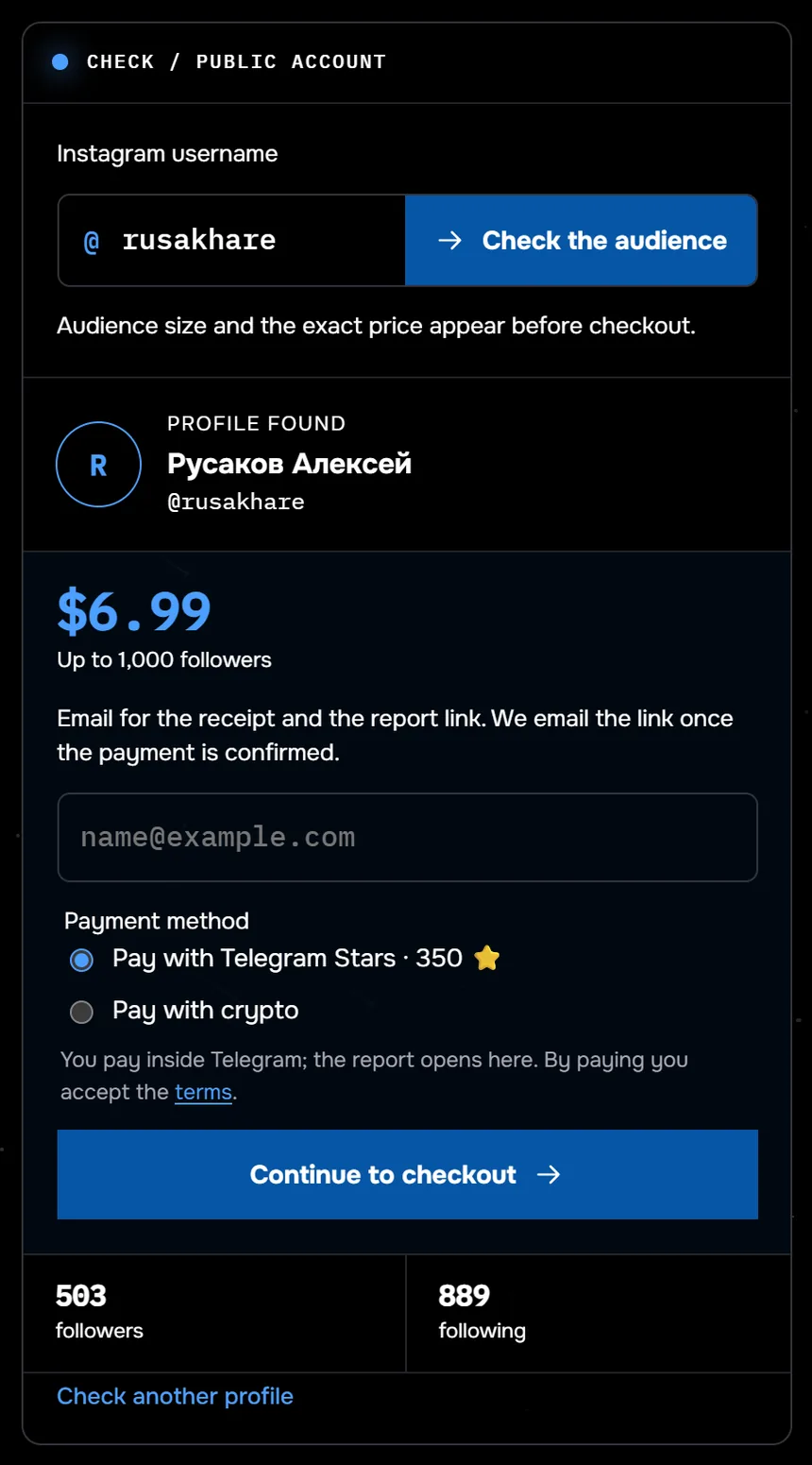
The screenshot shows the fake follower check before payment: the profile @rusakhare was found, with 503 followers and 889 following. Checking a profile with up to 1,000 followers costs $6.99.
The login scheme started with your password. This report never asks for one: it works with a public profile, without signing in.
Signals from a public profile: count, share and a list for manual review. No login or password.
Check followers by signalWhere the line is: checking an audience is fine, buying bots for someone else is not
Anyone can see a public profile and its followers. The report works with the same public information and changes nothing in the other account. Our guide to spotting bought followers shows how purchased audiences look from the outside.
Ordering bots for someone else's account to get it restricted is still buying fake engagement, which Meta's spam policy bans. Bots from such an order act as a network of fake accounts. Meta's Inauthentic Behavior policy, last updated December 11, 2025, covers deception through such networks.
Common questions
Can you get free followers with no consequences?
No. Meta's spam policy bans trading and buying engagement, and a password given to a service opens the whole account. The platform removes inauthentic activity and may limit parts of the account.
Can your account get banned for traded or bought followers?
The help center says accounts that keep using apps for likes and followers may find parts of the account limited, and such accounts may be disabled or terminated. The platform does not publish the thresholds.
Will Instagram remove fake followers on its own?
In part. It removes activity from accounts generating inauthentic likes and follows when it finds them, and it routinely removes disabled accounts. Nothing in the help center promises to remove every one, so some task followers will stay.
How do you remove fake followers yourself?
Change your password and remove outside app access first. Then remove followers by hand, one at a time and with breaks. The signal report lists flagged profiles for manual review.
Sources
- Meta Transparency Center: Spam policy
- Meta Transparency Center: Inauthentic Behavior policy, updated December 11, 2025
- Instagram Terms of Use
- Instagram Help: why you should not use apps that offer likes and followers
- Instagram Help: changes to your likes, follows or comments
- Instagram Help: account restricted for automated access and data collection
- Instagram Help: Recommendations Guidelines
- Instagram Help: keeping your account secure
- Instagram Help: why Instagram tells you your account is at risk
- Instagram Help: change your password
- Instagram Help: apps and websites connected to your account
- Instagram Help: two-factor authentication
- Instagram Blog, November 19, 2018: reducing inauthentic activity