Search by name and username
To find someone on Instagram, one exact detail is enough: the username or the display name. The username is the handle that appears in the page address. The display name is free text: “Marina Kozlova”, “Marina K.” or just “Mari”.
Search compares your query with the username and profile name, according to Meta’s Transparency Center. Other signals shape the order too, such as your past visits to the page and what people in your country tap for the same query. Meta also lists age and who each of you follows.
In the app
- Tap the magnifying glass in the bottom menu.
- Type a username or a surname into the field at the top.
- Switch to the Accounts tab, and photos, hashtags and places drop out of the results.
- Check the photo and mutual friends before you send a message.
Instagram Help lists what keywords can find: photos and videos, hashtags, accounts, audio, tags and places. A short query like “Anna” returns hundreds of namesakes. Start with a surname or a rare spelling, then add the rest.
Spelling variants and transliteration
One letter changes the results, so try several spellings. A passport spelling finds “Kozlova”, while a casual one may be “Kozlowa”. Check dots and underscores in the username separately. Test short forms too: Alex, Sasha and Alexander count as different people in the results.
A username often lives outside Instagram too. Nail artists and small shops print it on business cards, bags and price tags. One exact line from a business card spares you the guessing.
In a browser and through a search engine
On a computer the steps match: the magnifying glass in the left panel and a field for a username or name. A page address in a browser is built from the username: instagram.com, a slash and the handle. Instagram Help says anyone can see public posts by visiting instagram.com.
A search engine helps when you know the person and their city but not the username. Type their full name, city and the word Instagram into your browser. Confirm the username inside the app, since people change handles and old copies of pages stay in results for a while.
How to find someone by phone number
Meta’s Transparency Center describes matching your query with the username and profile name and says nothing about phone numbers. Instagram Help adds that the number is visible only to the owner. So don’t count on typing digits into the query field. The number works another way, through your phone contacts and account suggestions.
In its explainer on suggested accounts, Meta describes contact syncing. Instagram periodically syncs your address book and uses it to recommend accounts. The setting lives in Accounts Center, and Instagram Help gives the path.
Step by step
- Save the person’s number in your phone’s contacts.
- Go to your profile, tap Menu and open Accounts Center.
- Tap Your information and permissions, then Upload contacts, pick yours and turn on Connect contacts.
- Give the app time, since syncing runs periodically and not instantly.
- Check the Suggested for you and Discover people sections in the Following tab.
The suggestion depends on the number: it has to be linked to the person’s profile, or there is nothing to match. Contacts work together with other signals, covered below. A contact from your address book will not necessarily appear first or right away.
The other person can remove themselves from similar account suggestions on other people’s pages. How that works is covered in suggested and similar accounts on Instagram.
Through mutual friends and suggestions
The Followed by line and suggested accounts
On someone’s page, a Followed by line under the bio lists people you know. It shows which accounts you follow already follow this page. That works as an identity check: mutual friends confirm you found the right person and not a namesake. How to open the full list is covered in mutual followers on Instagram.
Account suggestions come from a set of signals. Meta lists the number of mutual friends, the followers of accounts you follow, and whether that person follows you. So a new acquaintance who already followed you or your friends may show up there.
Followers of a friend, school, workplace or neighborhood
When you lack a username but know the shared circle, look through followers. A classmate often follows the school or graduating class page. A colleague follows the company page, and a neighbor follows the building or neighborhood page.
- Open the page of a mutual friend or a community.
- Tap the number of followers or following.
- Type a surname or part of a username into the field above the list.
- Try two or three spellings.
An empty result for every spelling means one of two things: the person is not on that list, or they follow under a nickname. Then check the next circle.
Why search does not show the person
An empty result does not prove the page is gone. There are five causes, and from the outside they look the same.
- The person changed their username.
- The owner temporarily deactivated their profile.
- The account was deleted.
- The person blocked you.
- The page shows a nickname or a business name instead of a real name.
If the username has changed, try the name or mutual friends instead. While a profile is deactivated, its photos, comments and likes stay hidden until the owner logs back in.
Instagram Help says a blocked person cannot find the profile, posts or story of whoever blocked them, and people aren’t notified when you block them. From the outside this looks like a deleted account. The signs that tell them apart are in how to tell if someone blocked you on Instagram.
A private account in results
Being private hides posts, not the header. Instagram Help on public and private accounts says a profile photo, name, username and bio stay visible to anyone, even on a private account. Its photos and videos are visible only to followers. Users under 18 are set to private by default. What to do when someone’s following list will not open is covered in can’t see someone’s following list.
When the person is lost in a long list
The field above a list works when you know the name the person uses. Take a school page with 3,000 followers. You remember a classmate’s first name and graduation year, but not her married surname. Scrolling that list on a phone takes ages.
The Sled report collects the full following and followers lists of a public profile. It includes search by name inside the list and CSV export, so you can open the list in a spreadsheet. The check runs on public profile data, with no login to your account. The page owner gets no notification and does not see the check.
Private accounts are filtered out before payment, and the price is shown before you pay. In a spreadsheet, every Marina on the list sits side by side, and the username narrows them down, say by the digits of a graduation year.
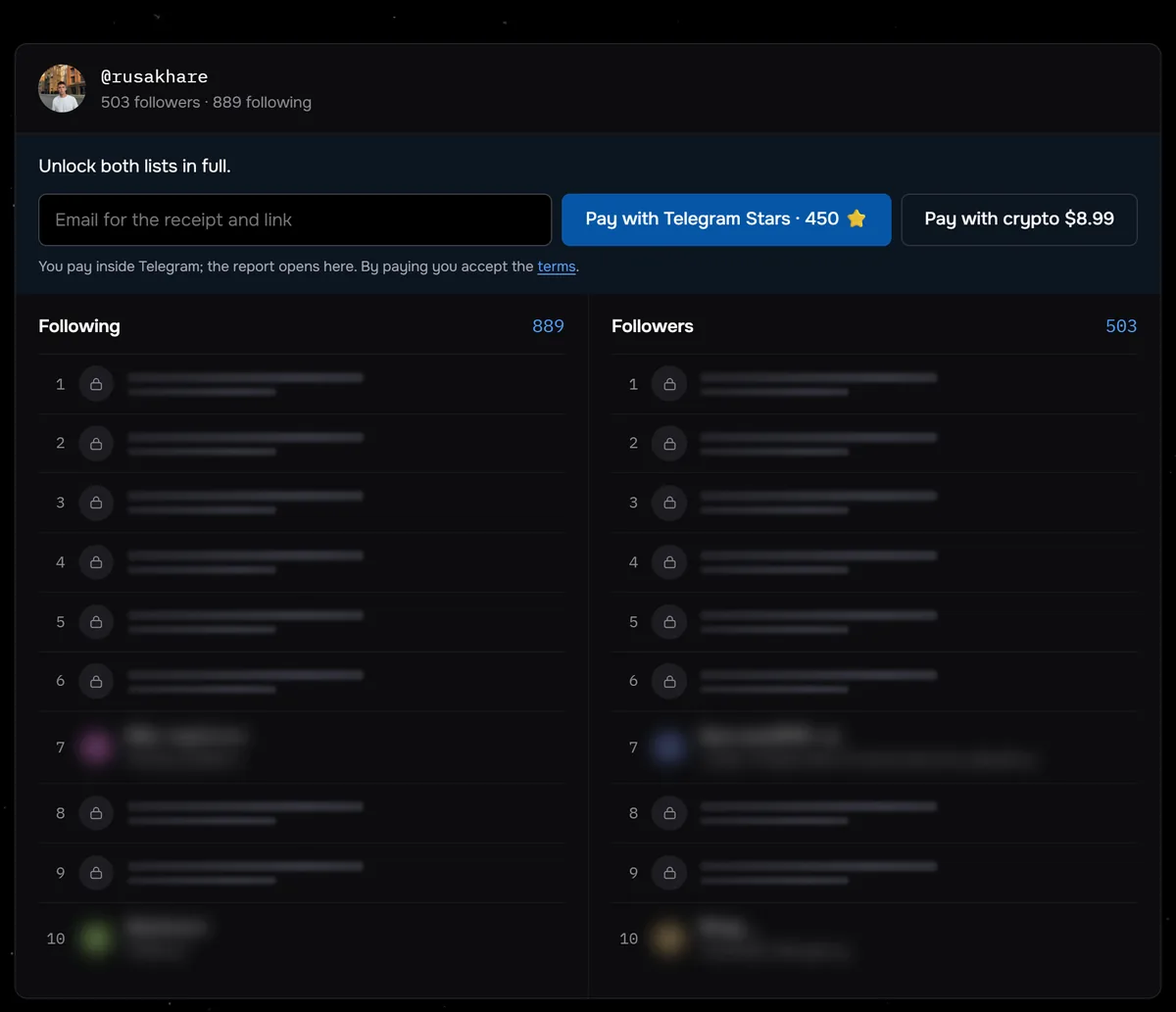
The screenshot shows a check of @rusakhare before payment: 503 followers, 889 following and the price are visible right away, and both full lists unlock after payment. Between August 24 and September 27, 2026, Sled ran paid list checks on 117 profiles. Half of them had fewer than 359 followers and fewer than 350 following.
Open both lists of a public profile in full and find the person with one query. No login to your account.
Open the listsWhere to draw the line
Instagram’s Community Guidelines ban bullying and harassment. Instagram removes personal information shared to blackmail or harass someone, along with repeated unwanted messages. The app has no built-in way to look people up by photo, and its Help Center talks only about keyword queries. A person in someone else’s photo never agreed to be identified by every viewer.
Face recognition tools, lookups by phone and purchased databases are left out of this guide on purpose. They work without the consent of the person being sought. A fake account made to get into a private profile is not a way to find a person either.
Per Instagram Help, a blocked person can no longer mention or tag the person who blocked them, and their messages are not delivered. A second account made to get around a block turns contact into harassment. Silence in reply to messages or a page switched to private is an answer too. The respectful move is to leave the person alone, and that includes not reaching them through mutual friends.
What an owner sees about visits to their page is covered in who viewed your Instagram profile.
Common questions
Will someone know you looked for them?
Meta’s explainer lists the signals behind the results. They include age, a match with username and profile name, your past visits to the page, the choices of people with the same query, and who each of you follows. What an owner sees about visits to their page is covered in our guide on who viewed your Instagram profile. Visible traces come from actions: a follow, a like, a comment or a message.
Can you find a person by a number that is not in your contacts?
Don’t count on the query field. Meta describes matching your query with the username and profile name, and Instagram Help says the phone number is visible only to the owner. A number works through contact syncing, and suggestions are built from your own address book. Save the number first, then wait for a suggestion.
Does a private account show up in search?
Instagram Help says anyone can see the profile photo, name, username and bio of a private account. Its photos and videos open only to followers.
Can you find someone on Instagram without an account?
An exact username gives a page address on instagram.com, and Instagram Help says anyone can see a public page there. Typing a surname and city into a browser works too. The Sled report on a public profile needs no login to your account either.
Sources
- Meta Transparency Center: how Instagram search works, updated June 23, 2026
- Meta Transparency Center: suggested accounts and contact syncing, updated March 7, 2025
- Instagram Help: search on Instagram
- Instagram Help: who can see your profile on the web
- Instagram Help: change your name, username and profile picture
- Instagram Help: disconnect contacts syncing
- Instagram Help: temporarily deactivate your profile
- Instagram Help: what happens when you block someone
- Instagram Help: public and private accounts
- Instagram Community Guidelines