What Instagram shows as mutual followers
The Followed by row and the full list
The row sits under the name and bio. It holds small photos of people you know, their usernames and a count of the rest. Only someone logged in to an account sees it. Without a login there is nothing to compare the page with.
- Open Instagram on your phone and find the profile through search by username or name.
- Look under the bio for the row that starts with Followed by.
- Tap the row to open the full list of these names.
In a browser the steps match. Log in at instagram.com and open the page by username. The row sits in the header, and clicking it opens the same set of names. It uses the same following list as the app.
Why you and a friend see different names on the same profile
Instagram builds the row from the viewer's following list. It takes your following list and keeps only the accounts that are among the public profile's followers. A friend's circle holds other people, so the overlap differs too.
Take a coffee shop with 3,000 followers. You see two colleagues under the header, your friend sees a classmate, and a new visitor sees nobody. All three are right, and none of these sets describes the coffee shop's audience as a whole. The wider your own circle, the better the odds of spotting friends there.
The row answers a narrow question: which people from your circle follow this page. A friend on the shop's following list who is not among its followers never appears there.
Why the row is empty or shows the wrong people
An empty spot under the header or an odd set of names comes down to four causes.
You follow none of the page's followers. There is no overlap, so there is no row under the header. A new acquaintance from another city or a shop you found yesterday looks like this. The row appears once someone on your following list starts following that page.
The profile is private and your request is still pending. The table in Instagram Help splits connections by account type. Private accounts in the lists of a private account are visible to its followers only. Public accounts in the same lists are visible to anyone on Instagram. So friends with private accounts drop out of its connections for you.
Someone you know changed their username. The row now shows the new username, and the person is easy to miss. The About this account section in the menu of their page shows how many times the username changed. Instagram Help on About this account is explicit: you see the number of changes, not the former usernames.
The names vanished from the page of someone you fell out with. The signs of a block are collected in how to tell if someone blocked you on Instagram, along with how a block differs from a deleted account.
Mutual followers, shared following and friends in common: the difference
Three similar phrases describe different things. Confusion starts when people search for a friend in the wrong place: among followers instead of following, or in suggestions instead of search. The table puts them side by side.
| Term | Who is in it | Where you see it |
|---|---|---|
| Mutual followers | people you follow who are among the account's followers | the row of names under the header |
| Shared following | accounts that both you and the owner follow | no separate screen, only search in the owner's following list |
| Friends in common | people you know who are in both the owner's followers and following | no separate feature, manual check only |
| Accounts with shared followers | similar public pages, not people | About this account |
The last row of the table is the easiest to misread. According to Instagram Help, some profiles have an Accounts with shared followers item inside About this account. It shows other public accounts that have the most followers in common with the one you are viewing. Help describes it as a way to find accounts with similar interests. There are no people there, and it says nothing about your friends.
Instagram has no separate screen for friends in common. It does count them in suggestions. The Meta Transparency Center names the number of mutual friends among the signals for suggested accounts, along with whether the account is following you. Our breakdown of suggested and similar accounts covers how those suggestions work. The guide to mutual follows on Instagram explains what a two-way connection means.
How to find friends in common by hand
The row shows only the account's followers. A friend can be on its following list and still never show up in the row. A manual check of both lists gives the full picture for a handful of people.
- Write down the usernames of the friends you are looking for. Five or ten names from school, work or the gym are enough to start.
- Open the profile's followers and type the first username into search.
- Then open its following list and check the same username.
- Mark the outcome: in both lists, only in followers, only in following, or nowhere.
- Go through every name this way and collect the marks in one note.
A friend found in both places is the closest thing to what people call a friend in common. They follow the page, and the page follows them back. How to see who someone follows on Instagram walks through search inside another person's lists.
Your personal connection with someone shows up in shared activity. According to Instagram Help, See shared activity sits in the menu of a profile in the app on phones and iPads. It works when at least one of you follows the other. Inside are tags, likes and comments between the two of you, plus how long each of you has followed the other. It helps when you need to recall how you know someone.
Five or ten names work fine by hand. Hundreds take hours: the time estimate for a manual check shows how long.
Every connection of an account in one pass: the mutual follows report
The row shows only your circle. It does not say whether the connection runs both ways. Friends on the owner's following list who are not among its followers do not show up at all. The mutual follows report covers both gaps for a public account, yours or someone else's.
The report works from a profile's public data, with no login to your account and no password. It takes both lists, following and followers, in full and compares them. Connections fall into three groups.
- Doesn't follow back: the person is on the owner's following list but not among its followers.
- Follows one-sidedly: the person is among the owner's followers but not on its following list.
- Mutual: the connection goes both ways.
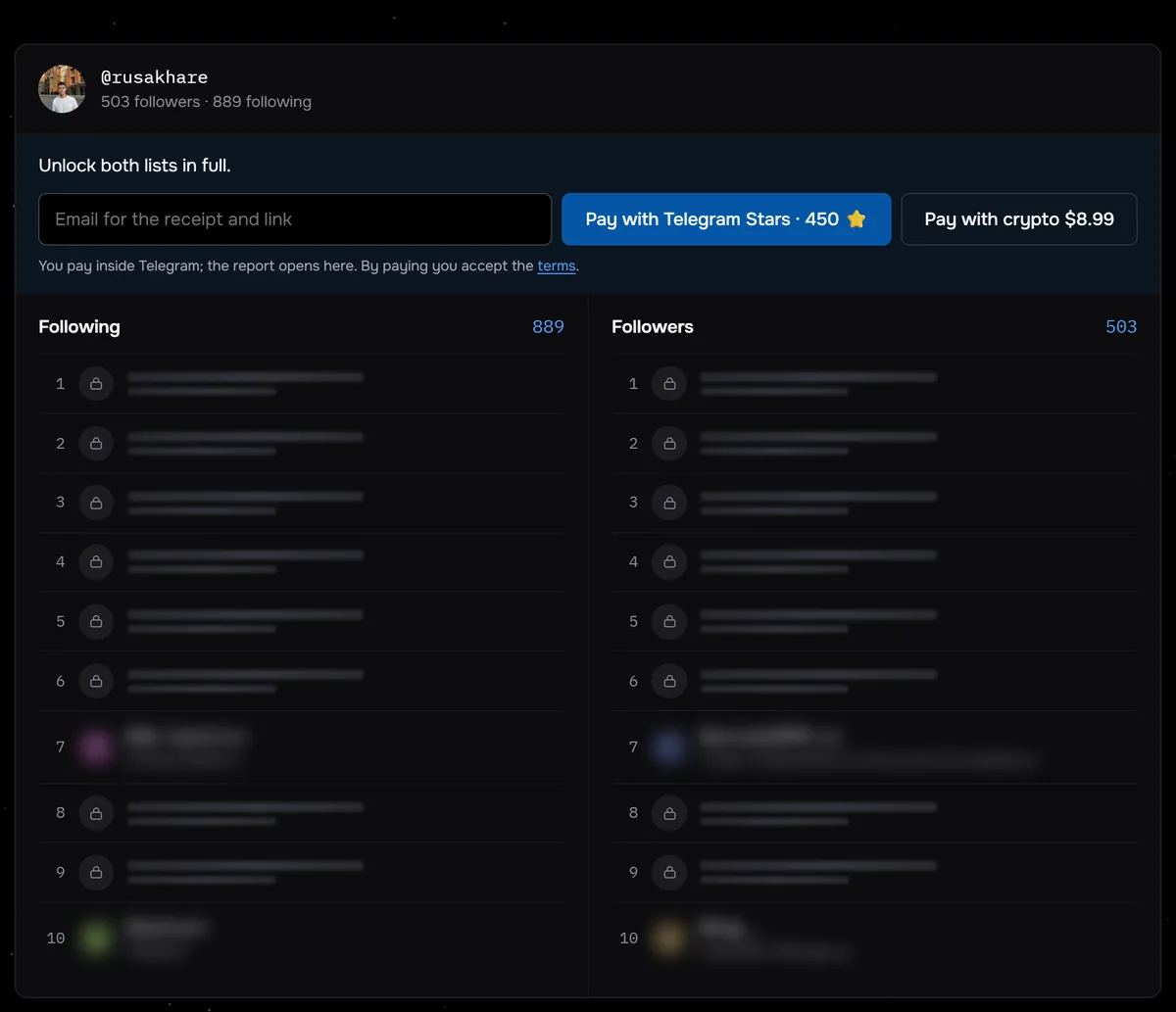
The screenshot shows the check for @rusakhare before payment: 889 following and 503 followers, with both lists locked. These numbers alone mean at least 386 accounts he follows do not follow him back, so the report would put them under Doesn't follow back. Of the 117 profiles checked through Sled between August 24 and September 27, 2026, 43 followed more accounts than they had followers.
Friends inside the groups are found through search by name. The report comes with a CSV export, a spreadsheet file of usernames. To compare with your own circle, run a second check on your own account. Usernames that appear in both exports show your friends among the page's connections. The report has no dates, and it shows the state at the moment of the check. A private account is turned away before payment, and the report link stays live for 7 days.
The check runs inside one account. The report does not look for the audience overlap of two different pages, and it does not rebuild the row from your point of view. Two profiles take two checks and a comparison of the two exports.
Check a public account and get its connections split into three groups, with search by name and a CSV export.
Compare an account's connectionsWhere the boundary is
The followers of a public account are public data. Checking the overlap before a first meeting, a deal or a joint live stream with a creator is fine. Those names tell you who in your circle already knows the person and whom to ask for a reference.
The boundary sits where looking turns into control. Do not use it to watch a partner, to pressure someone through shared friends or to reach a person who blocked you. A block is that person's decision, and working around it through other accounts is not acceptable. If someone asked you not to look for them, that is a boundary too, and shared friends do not cancel it.
A private account will not hide you from the row on someone else's page. According to the table in Instagram Help, anyone on Instagram can see the private accounts among a public profile's followers. Private mode narrows the audience only for your own page: private accounts in your lists are visible to your followers only. While you follow a page, your own followers see you in the row under its header. People who are not among your followers do not see you there. According to Instagram Help, a private account can remove people from its followers, and blocking someone also makes them stop following you.
Common questions
Will someone know I looked at who we have in common?
Shared activity has no such mark. Instagram Help lists tags, likes, comments and follows there, and profile visits or opened lists are not part of it.
Why does a friend see different names on the same profile?
The row is built from the viewer's following list. A friend keeps up with a different set of accounts, so the overlap with the audience differs. Two people see the same names only when they follow exactly the same followers of that page.
Can I hide myself from someone else's mutual followers?
Private mode does not do it: anyone on Instagram can see the private accounts among a public page's followers. While you follow the page, your own followers see you in that row.
How do I find the followers two other accounts share?
The row compares a page only with your own following list. Two other accounts need both follower lists in full and a comparison of usernames. The mutual follows report gives a CSV export for each of them, and you match the names in a spreadsheet.