Unfollows that are normal
Some losses have nothing to do with your content. People prune the accounts they follow, the platform removes disabled profiles, and giveaway entrants leave after the draw. Tell this background apart from a real signal.
People cleaning up who they follow
People follow hundreds of accounts, and their feed clogs up over time. Every few months they scroll through the list and drop anyone they no longer watch. Strong creators get cut as well. In a ranking explainer dated 31 May 2023, Instagram head Adam Mosseri writes that you can stop seeing posts from an account by unfollowing it at any time.
Leaving after a giveaway
A giveaway that requires following the organizer brings people in for the prize, not the content. Take a giveaway that added 800 followers, with 200 of them gone a week later. That is the cost of the format, not a failure of your posts. The warning sign is longtime followers leaving along with the entrants.
Deleted and disabled accounts
The Instagram Help Center says the platform routinely removes disabled accounts, so your follower total can change within a short time. Deleted accounts, bots and spam profiles drop off the list without anyone deciding to leave. On 19 November 2018 Instagram announced it would start removing inauthentic likes, follows and comments generated by third-party growth apps.
Common reasons people unfollow
When losses rise above the background level, look for the cause in the account itself. Among the main feed signals Instagram lists a person's history of interacting with an author and how interesting that author seems to them.
A change of topic
People followed for recipes, and for three months the account has been posting about the author's move abroad. For the author that is growth, for the follower it is a different subject. This kind of loss stretches over weeks, as every new post filters out someone who came for the old content. In insights it shows up as a steady, higher loss rather than a spike.
Posting frequency and repeats
Posting frequency can go wrong in two directions. Five posts in one evening after a silent month read as spam. Mosseri writes that the feed tries to avoid showing too many posts from the same person in a row, so a burst will not reach followers in full. The opposite extreme is six months of silence, after which nobody recognizes the account during a cleanup. Repeats annoy people most: the same sale, the same caption, the same video twice.
Ads and sales in every post
Followers come for something useful or for the person behind the account. When every post sells, the account becomes a shop window and the useful material gets lost between offers. Take a phone repair technician: a breakdown of a cracked screen collects saves, while a third discount post in a row drives people away. Neither selling nor ads push followers out on their own. A feed with nothing else does.
Stories without a break
Stories disappear after 24 hours, and viewers tap through a run of thirty frames fast. Instagram ranks stories partly by how often a person views an account's stories. A tired viewer mutes first: the Help Center explains how to mute someone's posts, stories and messages, and the person is not told.
How to use insights to see what drives people away
According to the Help Center, anyone with a public account, personal or professional, can view insights. The follower metrics include growth: the number of followers you gained or lost. You pick a timeframe within the past 90 days. Our guide to Instagram insights shows where to find these screens.
- Take a 30-day period and mark the days when losses doubled compared with a typical day.
- Open your grid and story archive for the same dates.
- Find what went out the day before each spike: a post, a run of stories, an ad or giveaway results.
- Look for repeats: a spike after every sponsored post weighs more than a single case.
Check stories separately. The Help Center page on story insights counts follows among the actions people take from a story. A run with zero follows and a loss in growth on the same day shows where viewers got tired. A pattern appears when the spike repeats after similar posts two or three times.
Growth in insights counts people, not names. The built-in screens never show who exactly left on the day of a spike.
Who exactly left, and when
The Help Center states that people won't be notified when you unfollow them. Instagram stays silent when you lose followers, and names only come from comparing your follower list on different days. The methods are weighed in our side-by-side guide to tracking lost followers, and a manual check is covered in the iPhone guide.
The Sled report compares two snapshots of your follower list taken on different days. Names of people who disappeared arrive by email, and the history by check date lives on a private page. Tracking ends on its own, with no repeat charge.
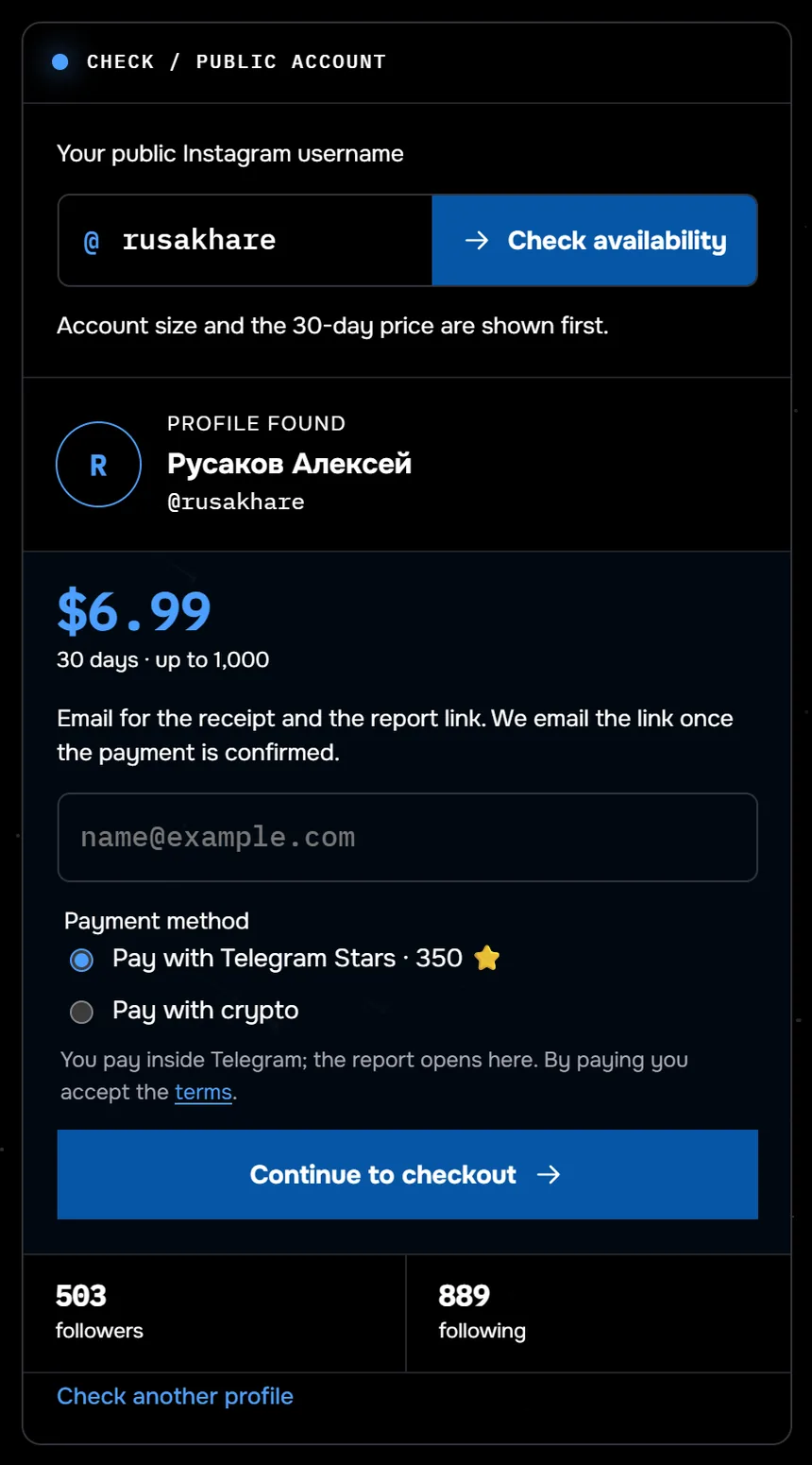
The screenshot shows the unfollower check for @rusakhare: 503 followers, 30 days for $9.99 (the old price is on screen). Half of 117 profiles checked through Sled since 24 August 2026 had under 359 followers.
The person left somewhere between two checks, and Instagram does not reveal the exact time. A missing name does not always mean an unfollow: the person may have deleted the account or become unavailable. A list cannot tell those cases apart, and the report assigns no reason. Check dates line up with your posting calendar, so you can see which post came before each loss. Why you should not hand a password to a third-party app for this is covered in our look at tracker apps.
Get the names of people who left and match check dates against your posts, with no password.
Check who leftWhat to do about lost followers
Once you know why people leave your account in particular, sort the losses into background and signal. Background needs no action. Answer a signal with one change at a time, or you will not know what worked.
What to leave alone
- Some entrants leaving after a giveaway, as long as longtime followers stay.
- A one-off drop after a platform cleanup: deleted and disabled profiles will not come back.
- Losses after an honest change of topic, while new people arrive faster than old ones leave.
What to change
- Topic. Explain the pivot in a dedicated post and keep a series for your original audience.
- Posting frequency. Pick a rhythm you can sustain for three months, with no bursts and no gaps.
- Ads. Mix sales posts with useful ones and never run two sponsored posts back to back.
- Stories. Break one long run into short sets at different times of day.
Bots are handled separately. The Help Center describes a set of followers the platform flagged for review as possible spam or bots. You can remove them all at once, and they won't be notified. Do not message people who left or dig for reasons through friends or a second account. The calendar tests your change: a month later, compare losses on the same weekdays.
When a friend unfollows you
A personal loss stings more than a hundred strangers leaving. An ex, a friend or a coworker disappears from your followers, and it is tempting to read meaning into it. Friends leave for the same reasons strangers do: a crowded feed, fatigue, changes in their own life.
A friend also has a quieter option. In June 2021 Mosseri wrote that you can mute an account when you want to stop seeing what it shares but hesitate to cut ties entirely. People don't know you've muted them. So leaving is not the quietest way to stop seeing someone, and the reasons behind it vary.
- They cleaned up who they follow and removed everyone whose posts they had stopped opening.
- After a breakup, an ex does not want to see shared photos.
- The profile was deleted by its owner or disabled by the platform.
- They blocked you.
Our guide to the signs of being blocked helps tell a block from a deleted profile. Look at the relationship outside Instagram: meetings, calls, replies to messages. If the person is close to you, ask about the relationship, not about a button. Checking through a second account and complaining in comments repair nothing.
Common questions about losing followers
Why do I lose followers when nothing changed?
Part of every loss is background: people prune who they follow, the platform removes disabled accounts, and giveaway entrants leave. The signal is a spike on specific days. Growth in insights shows its date within the past 90 days.
Will someone know I stopped following them?
No. The Help Center states that people are not notified when someone stops following them. They would have to compare their follower list on their own to notice.
Why did my ex stop following me without blocking me?
Leaving removes your posts from their feed and keeps both profiles visible. After a breakup it is a way to avoid shared photos. It says little about you as a person, and a block looks different.
Can I see the exact time someone left?
No. Instagram does not reveal that time. A list comparison names the window between two checks in which the name disappeared.
Sources
- Instagram Help Center: unfollowing someone
- Instagram Help Center: changes to your likes, follows or comments
- Instagram: reducing inauthentic activity, November 2018
- Instagram: Instagram Ranking Explained, May 2023
- Instagram: shedding more light on how Instagram works, June 2021
- Instagram Help Center: mute or unmute someone
- Instagram Help Center: about Instagram insights
- Instagram Help Center: view account and content insights
- Instagram Help Center: view insights on your stories
- Instagram Help Center: manage unwanted followers