How to find the accounts you followed recently
Sorting your own following list in the app
Open your profile and tap your following count under your name. A sort option sits above the entries. Besides the default order, you can sort by newest follows first or oldest first.
Instagram launched date sorting for your own follows in February 2020, TechCrunch reported. A shop that wasn't in your list yesterday lands in the first rows once you sort by newest.
- Open your profile and tap your following count.
- Tap the sort option above the entries.
- Choose the order from newest to oldest.
- Write down the handles near the top that you don't recognize.
Sorting changes only the order of rows, and your following list itself stays the same. It adds no dates either. How other people's lists are arranged is covered in our guide on how to see who someone follows on Instagram.
Why rows have no dates and what the order tells you
Instagram shows no follow date on any row. There is only order. Our page on who doesn't follow you back says it plainly: follow dates don't exist, only the sequence of entries. With the list sorted newest first, the first row shows your latest follow. It can't tell you whether that happened yesterday or a month ago.
Only a comparison of two snapshots gives you a time window. Save the top rows today, as a screenshot or as handles in your notes. Open your following list again a week later. Handles missing from the first snapshot arrived within those seven days.
Where accounts you didn't follow come from
The three reasons above break down into four cases. The first two are harmless and come from taps on your own device. The last two call for a proper account check.
An accidental tap in suggestions, reels or ads
The Follow button appears almost everywhere: in the suggested accounts block in your feed, next to a creator's name on a reel, and on sponsored posts. A thumb brushes it while scrolling, and a single touch completes the follow. That is how shops, bloggers and recipe pages end up in the list.
Following from the wrong account
One app can hold several profiles: personal, work, a store page. You switch accounts by tapping the username at the top of your profile. After that, every tap acts on behalf of the other page. Someone follows a colleague from the personal profile while believing they are on the work one. Later they open the personal following list and find a follow they meant for the work profile.
The same thing happens on a shared phone or tablet. A child or partner scrolls the feed in your profile and taps buttons. The check is quick: look for the questionable handle among the follows of your other profile.
Third-party apps and websites you gave access to
Follower boosting services, follow-for-follow tools and unfollower trackers ask you to log in with Instagram or type your password. Once they have access, they act on your behalf. Instagram said in November 2018 that accounts whose owners shared their username and password with such services get used for likes, follows and comments.
Instagram Help describes a section that lists the apps and websites where you used your account to log in or connect. You remove access in the same place. The risks of signing in through such tools are covered in our article on apps that claim to show who unfollowed you.
Someone else logging in
The most serious case is when someone knows your password and signs in from another device. Instagram's guide to hacked accounts names the first signal: an email from security@mail.instagram.com about an email address change you didn't make. That message includes a link to reverse the change. The second signal sits in your settings: an unfamiliar device in your login list. The help page on recent logins shows where to find that list.
One odd follow doesn't prove a hack on its own. Checking your logins and the emails from the platform settles it.
What to do right away: a step-by-step account check
When accounts you didn't follow appear, work through the steps in this order. Close unknown sessions, change your password and turn on login protection first. Then remove apps and websites you don't need. Cleaning the list comes last.
- Logins. Open Accounts Center, then Password and security, and tap “Where you're logged in.” That page shows the devices that recently logged into the account. Log out of each one you don't recognize.
- Password. Change it in the same section. The new password shouldn't repeat the old one or any password you use on other sites.
- Two-factor authentication. Turn it on there too. A login from an unrecognized device will then require a code.
- Apps and websites. In settings, open Website permissions, then Apps and websites. On the Active tab, tap Remove next to any service you don't recognize.
- Email. Look for messages from security@mail.instagram.com about email or password changes. If you didn't change your email address, reverse the change right away with the link in that message.
Instagram's page on two-factor authentication describes a code requested whenever a device isn't recognized. A password without that code won't open the account.
If you're already locked out, with the password rejected and the email changed, recovery starts at instagram.com/hacked from the help page on hacked accounts. The steps are in our guide on how to recover an Instagram account.
How to remove follows that appeared without you and avoid restrictions
Remove the extra accounts only after the account check. Otherwise an app with access will put new follows in place of the ones you removed. You can unfollow right where your following list is open: the button sits to the right of each handle.
Work selectively and in small batches. Unfollow a few unfamiliar accounts, then take a break. Don't mix unfollows and new follows in the same session. Spread a large cleanup over several days. The platform doesn't publish how many unfollows per day are allowed.
A restriction shows itself right away: the button stops working and an error message appears on screen. Stop there and don't keep tapping. What those messages mean and how to lift them is explained in our article on Instagram restrictions. Why there is no button to unfollow everyone at once is covered in our guide to unfollowing everyone.
How to gather unfamiliar follows in one list
Accounts that got into your list without you almost never follow you back. A shop an app followed for you won't follow in return. That gives you a working method: unfamiliar follows gather among the accounts that don't follow you back. How to clean up one-sided follows is covered in our article on who doesn't follow you back on Instagram.
The mutual follow check on Sled compares the following and follower lists of a public profile, yours or someone else's. You don't log in and you don't share a password. The report arrives as three lists: doesn't follow back (you follow them, they don't follow you), follows one-sidedly (the reverse) and mutual. Inside each, rows run in the order they were added, newest first. There is search by handle and CSV export.
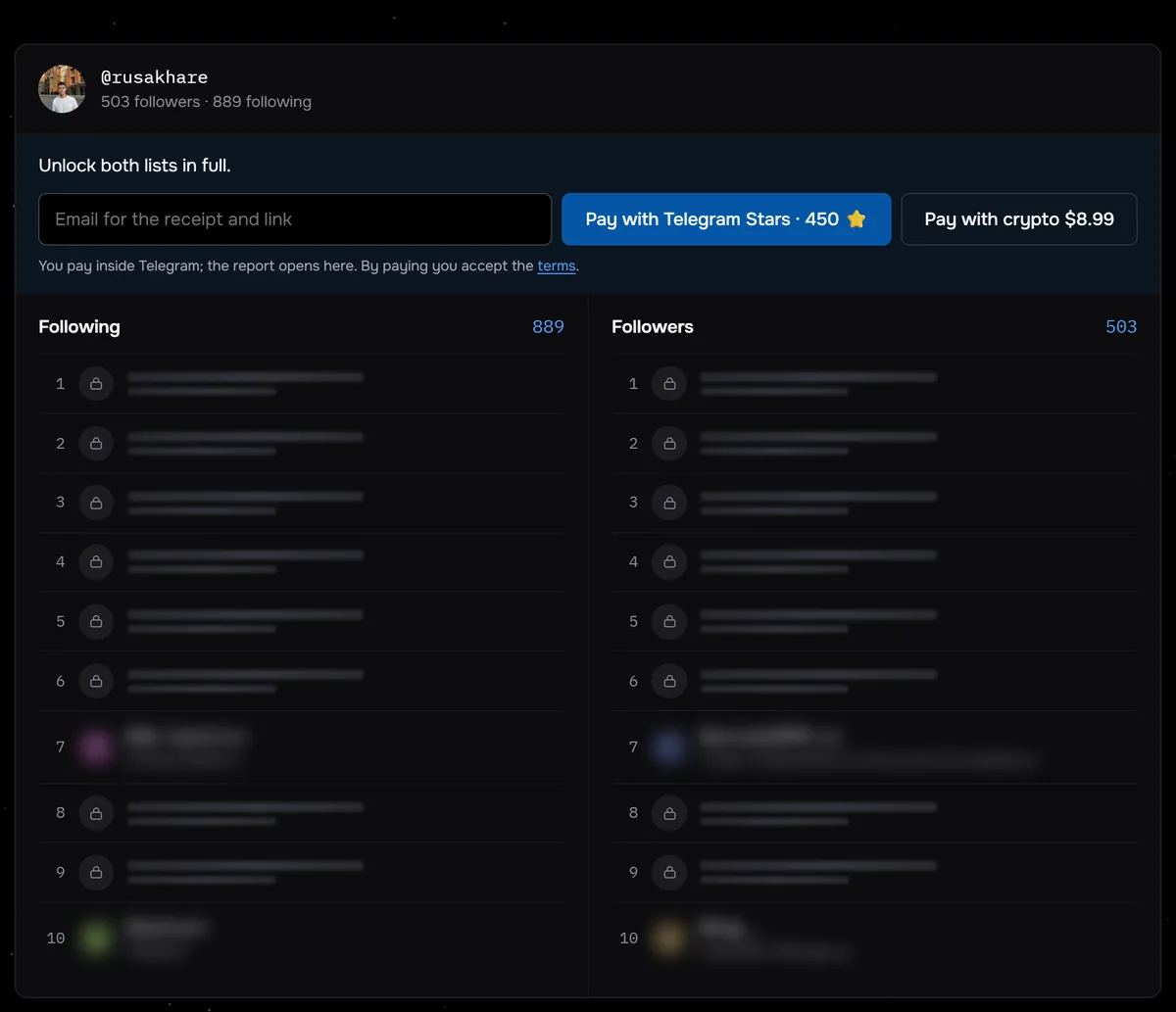
The screenshot shows @rusakhare with 889 following and 503 followers. So at least 386 of the accounts he follows don't follow him back, and the “Doesn't follow back” list would have at least 386 rows. Of the 117 profiles checked on Sled between August 24 and September 27, 2026, 43 followed more accounts than followed them.
Save the CSV of the “Doesn't follow back” list as a snapshot. A week later, run a new check and put the two files side by side. A new row in the second file is either a new follow or an older one whose account stopped following you back. Check each new handle yourself. The result link stays live for 7 days, so download the file right away. The price depends on the number of people in both lists combined, and you see it before paying.
The report shows no follow dates and doesn't say whether a person or an app made the follow. It doesn't detect a hacked account either. Unfamiliar accounts that do follow you back won't appear in the “Doesn't follow back” list. Look for those yourself in your following list in the app.
The report doesn't check private profiles. Their lists are hidden from outsiders, and such a profile is rejected before payment. For a private account, use the sort option in the app.
Accounts a public profile follows that don't follow it back, newest first. No login and no password.
Compare following and followersWhere the line is
Many services that promise to clean up your follows or reveal unfollowers ask for your username and password. With them, a program acts on the owner's behalf. That is exactly how unwanted follows end up in the list.
Sled never asks you to log in. The report relies only on what a public profile shows to any visitor. You need no password, no text message code and no connected app.
Frequently asked questions
Will an account know you unfollowed it?
Its follower count drops by one. The easiest way to find the name is to compare follower lists captured on different days. A shop or an empty profile rarely runs such comparisons.
Does one strange follow mean my account was hacked?
No. A single row can come from an accidental tap in suggestions or from a follow made on your other profile. Check where you're logged in and look for platform emails about email or password changes. If everything is clean, unfollow and watch the list for a week.
Will changing my password help if an app has access?
Yes, if you typed your username and password into that service: Instagram advises changing your password to revoke such services' access. Check apps you logged into with Instagram separately in Apps and websites and remove the ones you don't need. Then turn on two-factor authentication.
Can Instagram follow accounts for me on its own?
Instagram Help doesn't list that as a cause, and there is no official statement saying it happens. A follow comes from a tap: yours, another person's on your device, someone who logged in with your password, or a program with access to your account. Go through those four paths using the steps above.
Sources
- TechCrunch, February 6, 2020: following categories and date sorting
- Instagram Help: apps and websites connected to your account
- Instagram Help: what to do if your account was hacked
- Instagram Help: recent logins to your account
- Instagram Help: two-factor authentication
- Instagram, November 19, 2018: reducing inauthentic activity